Difficulty Level: Intermediate
Prerequisite: You should be familiar with Vue.js application and Axios as HTTP client in your project
Takeaways: This article helps to understand a practical approach to mocking api requests in frontend


Understanding the need for API mocking:
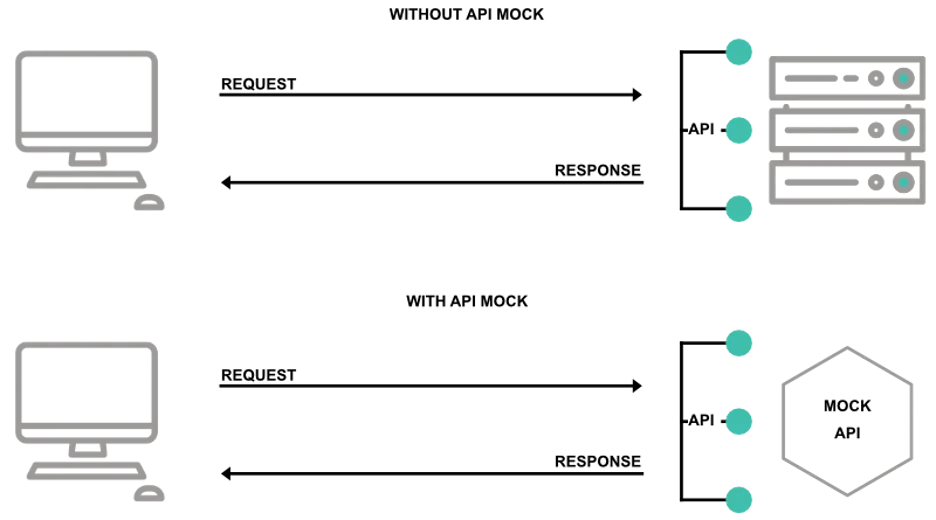
APIs play a pivotal role in modern web development, connecting frontend applications with backend services. However, relying on actual APIs during development and testing can introduce challenges, such as dependencies on external services, unpredictable responses, and potential rate limiting. Mocking API calls becomes imperative to create a controlled and predictable environment for frontend development.
Installation and Project Setup
Install and Setup Vue app
To initiate a Vue project, ensure you have Node.js installed. Open a terminal and run the below command
npm install -g @vue/cliThis installs the Vue CLI globally. Next, create a new project with
vue create project-nameNavigate to the project folder using cd project-name. To serve the project locally, run
npm run serveThis deploys a development server, and you can view the project at http://localhost:8080 in your browser. Customize your Vue project further by exploring the src directory.
Install Axios Library
To install Axios in vue project, a popular HTTP client for JavaScript
npm install axiosSimple Axios configuration to fetch data from backend
import axios from 'axios'

axios.get(`${endpoints.backendUrl}/api/user`).then(response => {
	// use the business logic here to handle response
})
What are Interceptors in Axios?
In Axios, interceptors are functions that allow developers to intercept and manipulate HTTP requests and responses globally before they are sent or after they are received. These interceptors provide a powerful mechanism to customize, modify, or handle aspects of the request or response flow. Axios supports both request and response interceptors, offering flexibility in managing API communication.
Configuring Axios Instance with interceptors
Let's take a simple example of Vue application and configure axios to mock api calls
Project folder structure:
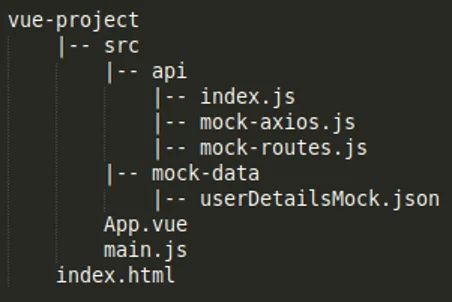
Write Code to mock Api calls with Axios
Filename -> vue-project/src/App.vue
<template>
  <h1>Mock Api Call Using Axios</h1>

  <div>User details: {{user}}</div>
</template>

<script>
import api from './api'

export default {
  name: 'App',
  data() {
    return {
      user: {}
    }
  },
  mounted() {
    api.getUserDetails().then((response) => {
      this.user = response;
    });
  }
}
</script>
Filename -> vue-project/src/api/index.js
import axios from 'axios'
import { enableMocking } from './mock-axios'
import mockRoutes from './mock-routes'

axios.defaults.withCredentials = true;

const useMockData = parseInt(import.meta.env.VITE_MOCK_API_DATA);

if (useMockData) {
  enableMocking(true);
  mockRoutes();
}

export default {
  getUserDetails() {
    return axios.get(`${endpoints.backendUrl}/api/user`)
  }
}
Filename -> vue-project/src/api/mock-axios.js
import axios from 'axios'

let mockingEnabled = false

const mocks = {}

export function addMock (url, data) {
  mocks[url] = data
}

export function enableMocking (state) {
  mockingEnabled = state
}

const isUrlMocked = url => url in mocks

const getMockError = config => {
  const mockError = new Error()
  mockError.mockData = mocks[config.url]
  mockError.config = config
  return Promise.reject(mockError)
}

const isMockError = error => Boolean(error.mockData)

const getMockResponse = mockError => {
  const { mockData, config } = mockError
  // Handle mocked error (any non-2xx status code)
  if (mockData.status && String(mockData.status)[0] !== '2') {
    const err = new Error(mockData.message || 'mock error')
    err.code = mockData.status
    return Promise.reject(err)
  }
  // Handle mocked success
  return Promise.resolve(Object.assign({
    data: {},
    status: 200,
    statusText: 'OK',
    headers: {},
    config,
    isMock: true
  }, mockData))
}

axios.interceptors.request.use(config => {
  if (mockingEnabled && isUrlMocked(config.url)) {
    return getMockError(config)
  }
  return config
}, error => Promise.reject(error))

axios.interceptors.response.use(response => response, error => {
  if (isMockError(error)) {
    return getMockResponse(error)
  }
  return Promise.reject(error)
})
Filename -> vue-project/src/api/mock-routes.js
import { addMock } from './mock-axios'
import userDetailsMock from '@/mock-data/userDetailsMock.json'

const mockRoutes = () => {
  //USER
  addMock(`${endpoints.backendUrl}/api/user`, { data: userDetailsMock })
}
export default mockRoutes
Filename -> vue-project/src/mock-data/userDetailsMock.json
{
	"name": "Test User",
	"email": "test@gmail.com",
	"mobile": "+1 345 253 234"
}
Conclusion
Axios interceptors are a powerful tool that empowers developers to take control of their HTTP requests and responses. By leveraging interceptors, you can implement global configurations, handle errors consistently, implement caching layer, mock api calls and address various real-world use cases seamlessly.
If you're looking to optimize your Vue.js applications with expert techniques like Axios interceptors and mocking, our team at Meant4 is here to help. With our deep expertise in web development and API integration, we can elevate your projects and deliver tailored solutions. Contact us today to learn how we can support your development needs!
Written by:

Chandra Sekar
Senior Frontend Developer
Chandra is an exceptional Vue.js frontend developer who consistently delivers outstanding results. With a keen eye for detail and a deep understanding of Vue.js, Chandra transforms design concepts into seamless and visually captivating user interfaces.
Read more like this:

Chandra Sekar
Unifying HTML and Vue components in Storybook

Ewelina Zwolenik
What is vuejs Transition component and how to use it?
Ewelina Zwolenik
How to Test VueRouter With Vitest
Ewelina Zwolenik
CSS Flexbox vs CSS Grid explained
Got idea?Let’s talk about your project
Schedule a call with us